Spark Unit Test Java Example
Unit Testing Spark Structured Streaming Application using Memory Stream.

Spark structured streaming provides the powerful API to build the continuous application. However when it comes to unit testing of the streaming application, I have found very limited information available over the Internet.
Overview
In this post, we are going to look into how we can write simple unit test code for structured streaming application in java and scala. We are going to use the junit framework to write unit test cases. We will leverage apache spark's memory streams.
Spark's Memory Stream is a streaming source that produces value stored in memory as they are added by the user. This source is intended for use in unit tests as it can only replay data when the object is still available. Once we create the memory stream, we have to add the test data to memory stream, We will apply some transformation, and will compare actual and expected result. Therefore memory stream is the stream of the data that supports reading in Micro-Batch stream processing.
Let's understand simple streaming job which we will use for the unit testing and unit test code for the same.
Note- We used a Scala API in this blog.You can find Java API code on GitHub.
Spark Structured Streaming Job
In our Streaming application we are filtering the persons whose department is 'marketing' . It is just simple filtering query we have written.
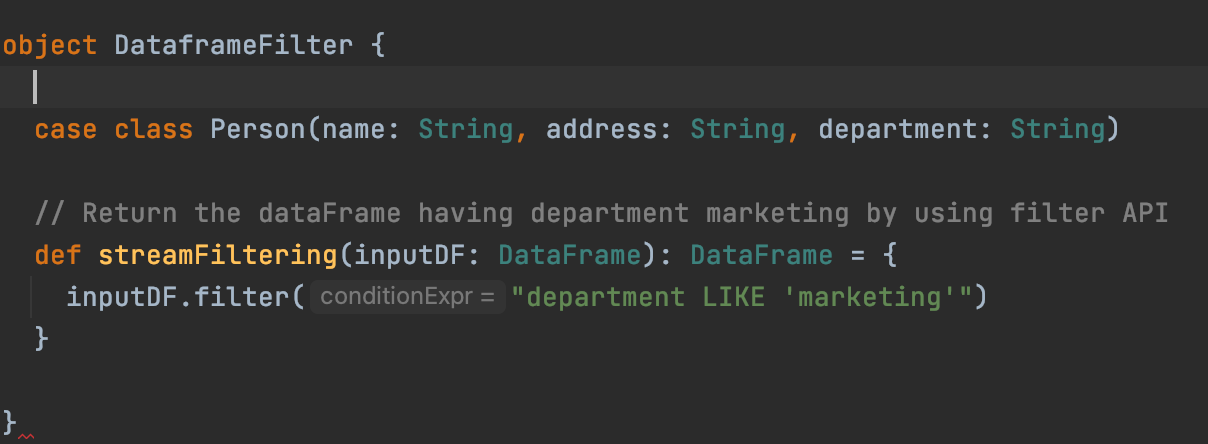
In above code,
- we are having Person case class, defines the attribute of the person.
- streamFitering method for which we are going to write the unit test.
Unit Test Code Using Memory Stream
Create Memory Stream -
          import org.apache.spark.sql.{Encoder, Encoders}
implicit val personEncoder: Encoder[Person] = Encoders.product[Person]val inputStream: MemoryStream[Person] = new MemoryStream[Person](1,              spark.sqlContext,Some(5))
implicit val sqlCtx: SQLContext =              spark.sqlContext
              val sessions = inputStream.toDF
We have created memory stream of the Person class and converted the memory stream to Dataframe[Person] using toDF
Call Transformation (Business Logic or the method for which we are writing the unit test) -
val filteredDF = DataframeFilter.streamFiltering(sessions) We are calling our filtering method, shown in above image. This method filters the person having department 'marketing'.
Write output to the memory table
val streamingQuery = filteredDF.writeStream.format("memory").queryName("person").outputMode("append").start Now we will write filtered stream to memory table 'person', keeping output mode append. This will start our streaming query. But as of now query is processing 0 rows, because we haven't added data to memory stream.
Add data to memory stream and process it
val inputData = Seq(Person("donna","india","finance"), Person("dora","india","marketing"), Person("dina","india","marketing")) inputStream.addData(inputData) streamingQuery.processAllAvailable()
We have created the Seq[Person], by adding data directly in the code . We can use json to read the, (Example is provided in the github java test code).
Assertion
val result = spark.sql("select * from person").collectAsList assertEquals("Filtering the Input Stream should get filtered correctly", 2, result.size)
assertEquals(RowFactory.create("dora", "india", "marketing"), result.get(0))
Using write stream we have saved data to the memory table person, Now we are reading the data from person table, collecting it as list and using it for comparison of actual and expected result. We can use the various spark sql commands and get the specific record for output comparison.
Add new data to same stream and process it
val inputData1 = Seq(Person("sam","india","marketing"), Person("sara","india","marketing")) inputStream.addData(inputData1) streamingQuery.processAllAvailable()
We have added the new two events to the stream and processed it. This will update the memory table with new data.
Assertion on updated data
result = spark.sql("select * from person").collectAsList assertEquals("Filtering the Input Stream should get filtered correctly", 4, result.size)
Finally on updated data we have written some more assertions. Now the result size of 4, because we have 4 events with the department.
With this we have successfully written the unit test for the spark streaming application!!
I hope you found this overview helpful!
For easy reference, you can find the complete code on GitHub. It will cover the unit test case in both scala and java API.
Source: https://blog.devgenius.io/unit-testing-spark-structured-streaming-application-using-memory-stream-fbaebfd39791
0 Response to "Spark Unit Test Java Example"
Post a Comment